EchoFlow
Practise any English material I like with the shadowing method. Interview self-introductions, travel phrases, the script for a talk — import any of them, and as I read aloud, the words on screen go from light to dark one by one with my voice. The web app I built to practise my own spoken English.
- Python
- FastAPI
- WebSocket
- AssemblyAI
- React
- TypeScript
- Cloud Run
- Firebase
- GitHub Actions
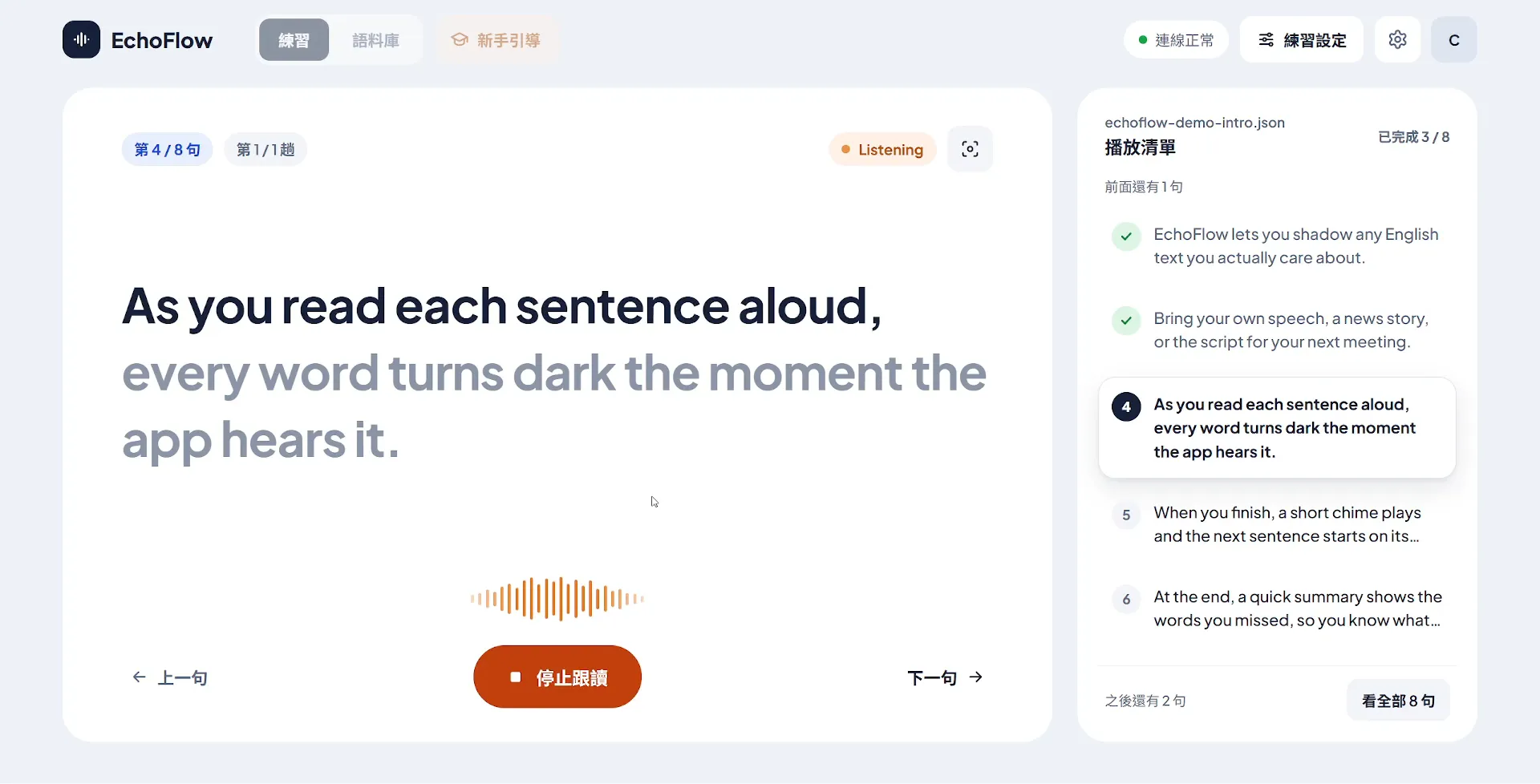
EchoFlow is a shadowing web app I use to practise my spoken English. As I read aloud, the words on screen go from light to dark one by one, following my voice like karaoke lyrics. Most importantly, I decide exactly what I practise.
Before building my own, I spent four or five months with Speak, starting in late February 2026.
It’s an AI language-learning app with a large collection of topic-based lessons and video lessons, and it guides you through shadowing: reading sentences aloud one at a time while the words on screen change colour with your voice. Practising this way builds muscle memory in your mouth while getting your brain used to grammar and sentence patterns. After that stretch of practice, I was convinced the method worked for me.
But after a good while, I came to feel that Speak’s biggest limitation was that the practice material was essentially whatever its curriculum laid out. Its speech recognition and word-by-word alignment are already quite good, yet I couldn’t use them on the material I actually wanted to practise. The app does offer AI-generated custom lessons, but in practice they usually came out only a few sentences long, and I could only give a general direction, with no way of knowing what the AI would produce.
Since shadowing worked for me, I started wondering: could I practise my own material the same way — example sentences for a particular grammar point, a story I had put together, an English self-introduction for interviews?
I wanted to fill that gap myself: a shadowing app where the words change colour with my voice just like in Speak, but where I choose the material, so I can practise any time on my phone or computer. (I wrote about my experience with Speak in more detail in a post about my Cambly lessons, written in Chinese.)
Shadow anything I want to practise
Turn Anything I Want to Practise into a Script
A script itself is simple: just a JSON file in a specific format. But splitting a self-introduction or a speech into single sentences that suit shadowing is still a real chore to do by hand.
So I put together an Agent Skill that writes up the format rules and sentence-splitting style guidelines as instructions for any AI Agent. That way, whichever AI tool I use — even a web-based AI chat — I just give it the Skill and the content I want to practise, and it produces a script ready for EchoFlow.
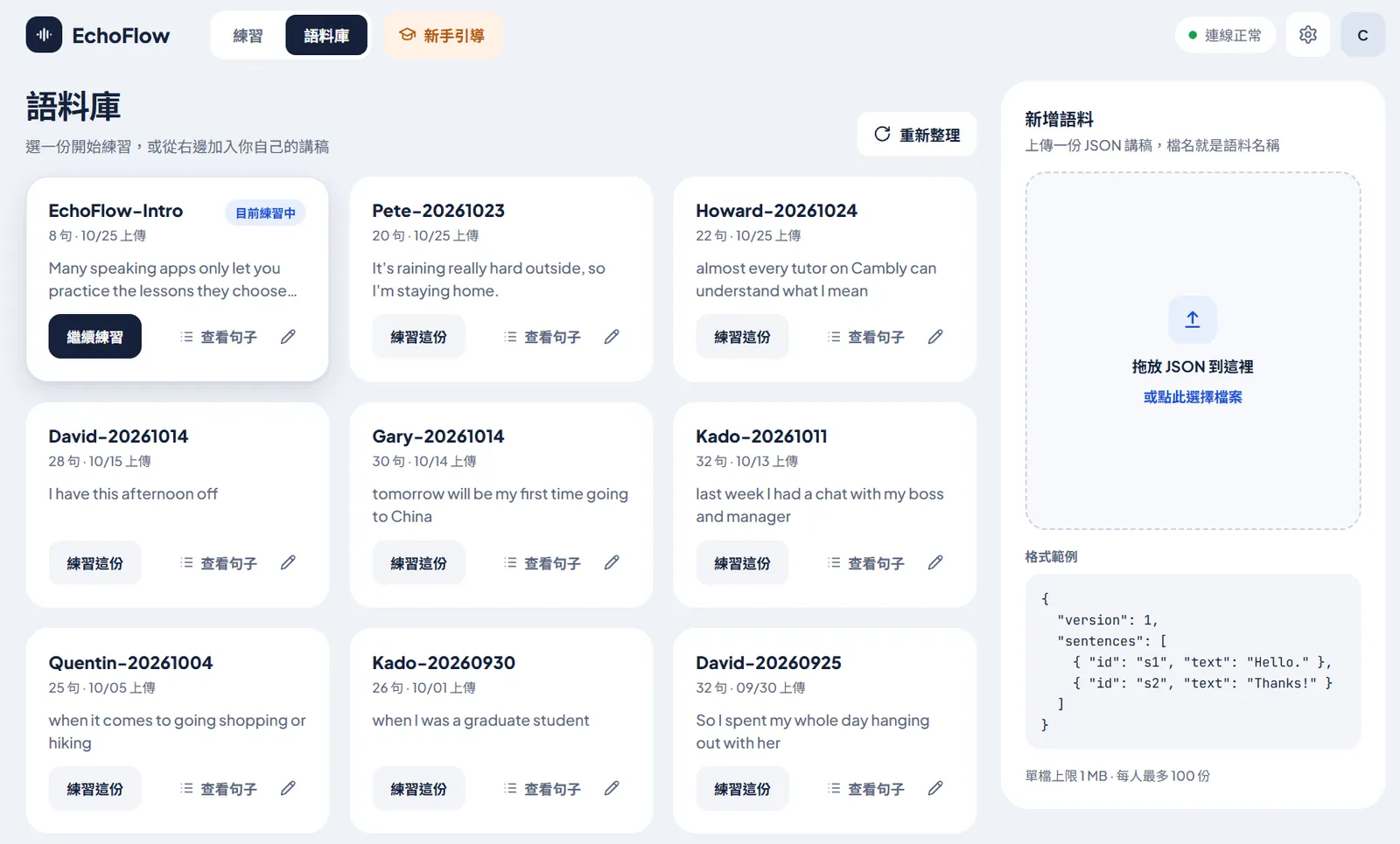
A finished script is imported through the upload panel in the Library. The Library is simply the list of practice scripts under my account: every script I’ve imported, practised or not, is managed here.
Words Darken as I Say Them
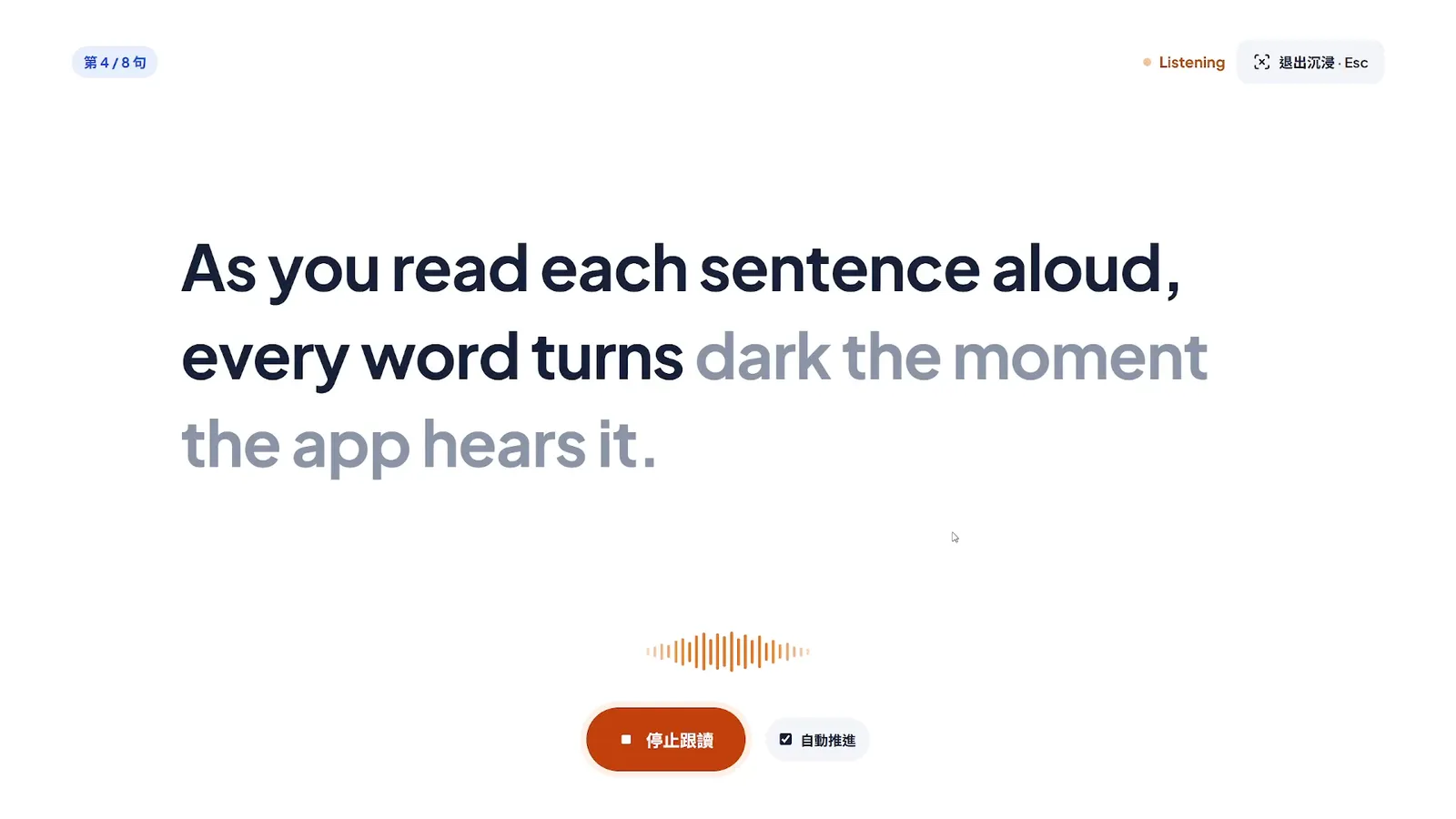
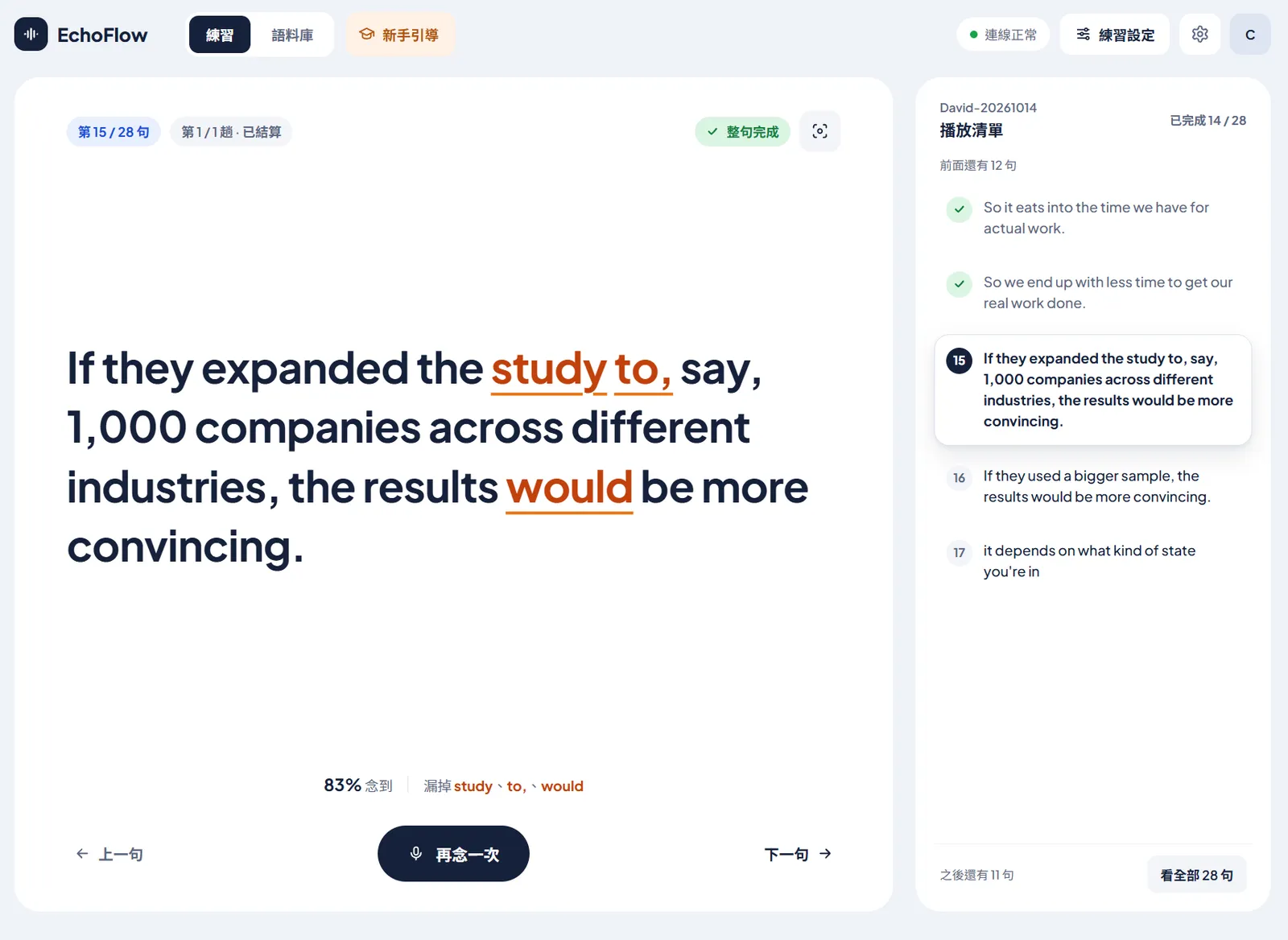
This is the core feature of the whole app. When I press “Start shadowing”, the browser cuts the microphone audio into tiny chunks and streams them to the backend in real time. The backend forwards them to a speech recognition service (I use AssemblyAI; “the recogniser” from here on), gets back “which words it has heard so far”, matches them against the script to work out which word I’ve reached, and darkens those words on screen. Once a sentence is finished, missed words are underlined in orange, and below it the app shows how much of the sentence I read and which words I missed.
Even before I started building, I had a feeling that matching the recognition results to the script would be full of subtleties. On the surface, it’s just comparing the words heard with the words in the script, but it isn’t that direct: people reading a script miss words and misread them; the recogniser guesses as it listens, so a word it heard one moment may be changed the next; and even when something is said correctly, the recogniser doesn’t always write it the way the script does (two written as 2, end to end as end-to-end).
Below are some of the problems I ran into while building it, and how I currently handle them.
First, Work Out Where I Am: Look Nearby for the Closest Match
The most intuitive approach is to compare the whole string of words heard against the whole sentence from the start, pairing them word by word. But that is essentially betting that the user reads the sentence in the right order without missing a single word. Miss one word in the middle, and everything after it falls out of alignment.
So I have the program remember which word of the script I’ve reached. Each time a new word is heard, it looks only a few words ahead of that position for the closest match; once it finds one, it moves the position to just after it. Words passed over in between can count as read if they’re small words like the or to; if they carry meaning, they’re recorded as missed, but the position keeps moving forward so the sentence doesn’t get stuck.
o read
~ skipped, still counts as read
  (depends on the strictness)
x missed

Example script; ^ marks the
current position
  I went to the store to buy
         ^
Next word heard: store
Looking ahead, it's the 3rd word

Relaxed: to, the can be skipped
  I went to the store
  o o    ~  ~   o
Standard: only the can be skipped
  I went to the store
  o o    x  ~   o
To judge whether two words are alike, I use spelling similarity: a score between 0 and 1, where an exact match is 1. The strictness in Practice settings lets the user adjust the threshold for this similarity.
Script lazy, heard lady
Spelling similarity 0.75

Relaxed   0.70 -> counts as read
Standard  0.80 -> doesn't count
Strict    0.88 -> doesn't count
Besides the threshold, strictness also sets how far ahead to look and which words can be skipped: Relaxed looks 5 words ahead and can skip common small words like the, a, to, of, and is; Standard looks 4 words ahead and can only skip the, a, and an; Strict looks just 2 words ahead, so essentially every word has to be read.
Very short words are a special case. it and its, or to and too, have a similarity of 0.80, so even Standard would let them through. So if either side is a word of two letters or fewer, the two have to match exactly.
The words recorded as missed are the ones underlined in orange once the sentence is finished.
One problem with this approach that I haven’t solved yet: missed words can’t be recovered. The position only moves forward, and a word passed over is recorded as missed on the spot; even if I notice and go back to read it again, the screen won’t fill it back in. For now, though, I think rhythm and fluency matter more, and this has little effect on how well shadowing practice works, so I’ve left it for later.
The Recogniser Revises as It Listens
As mentioned above, the app keeps sending the audio to the recogniser in small chunks. The recogniser sends back what it has recognised so far as it listens, and splits the speech into segments on its own; each update is its full current guess for the segment, from the start up to now. As the sentence becomes more complete, it may also revise earlier results based on context. One of the built-in sample sentences is Kubernetes and PostgreSQL are two of the technologies that our engineers rely on every day. Halfway through reading it, the recogniser first heard our engineers as originated, and only corrected it to our engineers in the next update.
Script
  ...that our engineers rely on
Update 1
  ...that originated
Update 2
  ...that our engineers
For the words to darken along with my voice, I can’t wait until the whole sentence is finished before sending it for recognition; I have to compare these still-changing results directly. That means handling two things:
- Each update is a whole segment, and words that have already been matched mustn’t be compared again. Otherwise, if the sentence contains the twice, a heard word already paired with the first the would be compared against the second one on the next update, and the second the would wrongly count as read. So the program remembers how far into the segment it has processed and only compares the new part.
- The last word that doesn’t match might be one I haven’t finished saying, or one the recogniser is about to revise. It doesn’t count yet; it gets compared again on the next update.
Update 1: ...that originated
  that matches
  originated doesn't
  -> hold it for the next update
Update 2: ...that our engineers
  that is done; start at our
  -> our and engineers darken
The cost is that only the last word gets a second chance; if an earlier word is revised, it won’t be re-compared. In practice, this recogniser rarely changes words it has already settled, so the cost is small.
The Same Number Can Be Written More Than One Way
The script spells numbers out as English words, but the recogniser tends to write them as digits. With the same sentence as before, Kubernetes and PostgreSQL are two of the technologies…, I say two and it writes 2:
Script  are two of the
Heard   are 2 of the
two and 2 have nothing in common in spelling, so the spelling similarity from earlier is no help here; and when the recogniser writes a word and when it writes digits isn’t something I can control.
My approach: when both sides are numbers, convert them to values first and compare only whether the values match, not the spelling.
Convert to values, then compare
  two               -> 2
  twenty one        -> 21
  twenty first      -> 21st
  two million       -> 2000000
The tricky part is that the same number can be read out in several ways, and years are the most common example. So when converting, the program works out every possible reading of a run of words, giving a set of values; if the two sides share any value, it counts:
2026 can be read as
  twenty twenty six
  two thousand twenty six
Both readings convert to 2026
Conversely, if the values differ, it doesn’t count as read. 2000 and 2001 have a spelling similarity of 0.75, so going by spelling alone, Relaxed would count it as read; once converted to values, it won’t. Ordinals and plain numbers aren’t mixed either: 21st is not twenty one.
I also ask the AI, in the Agent Skill that produces scripts, to keep numbers as they appear in the original: if the original says 2026, keep 2026 rather than spelling it out. Since matching can convert between the two forms either way, rewriting brings no real benefit.
One Word Heard, or Several?
The script and the recogniser don’t always agree on what counts as one word. A real example: end to end may come back from the recogniser as a single compound, end-to-end.
Each word in the script is one slot on screen. The fix is to split the heard word at the hyphen (or underscore), then match the pieces slot by slot.
Script  end to end   (3 slots)
Heard   end-to-end   (1 word)
Split   end | to | end
        -> all 3 slots match
The same problem can also go the other way: Speech-to-Text in the script is one slot on screen, but the recogniser may hear it as three separate words. So matching also allows joining several consecutive heard words and comparing them against a single slot in the script:
Script  Speech-to-Text  (1 slot)
Heard   speech to text
Joined  speechtotext    -> match
But there’s one case I don’t handle yet: two separate words in the script that the recogniser writes as a single word with no hyphen. For example, every day at the end of that same sentence may come back as everyday.
Script  every day   (2 slots)
Heard   everyday    (1 word)
The intuitive fix is to join every and day in the script as well and compare. But without a hyphen as a clue, the program can’t tell whether the heard word was always one word or several words stuck together; if this kind of joining were always allowed, a heard goat could wrongly match go and at sitting next to each other in the script. This is a known limitation I still have to deal with.
How Long from Speaking to Darkening
First, here’s where a word travels between my saying it and it darkening on screen:
[Taiwan] Browser
  Records audio, sends chunks
    | Connection A: WebSocket,
    | browser <-> backend
    v
[Taiwan] Backend (Cloud Run)
  Receives audio, forwards it
    | Connection B: WebSocket,
    | backend <-> recogniser
    | (official SDK)
    v
[US] AssemblyAI recogniser
  Turns speech into text
    | back over connection B
    v
[Taiwan] Backend (Cloud Run)
  Matches against the script,
  works out where I am
    | back over connection A
    v
[Taiwan] Browser
  Darkens the words read
Since deploying to the cloud, the delay I perceive while reading is about 600 to 800 milliseconds — the words still keep up with my mouth.
A large share of that time goes to geography. The backend is in Taiwan and the recogniser is in the US, and AssemblyAI doesn’t currently have a service endpoint in Asia: even when everything goes smoothly, a word usually takes 300-odd milliseconds to darken, and the round trip across the Pacific alone accounts for about 180 milliseconds of that. Most of the remaining time is spent waiting for the recogniser to send its results back. I’ve tried adjusting a few of the parameters it offers, but haven’t yet found a setting that makes the words darken noticeably sooner.
Words don’t darken one at a time, either. As mentioned earlier, the recogniser splits speech into segments. The last word spoken in a segment waits the shortest, around 240 to 420 milliseconds, while words in the middle of a segment often have to wait for the segment to wrap up before they darken. So on screen, words darken in clusters rather than following my mouth word by word; you can see this rhythm in the demo video at the top.
Practise at My Own Pace
I think rhythm matters a great deal in shadowing, and so does reading actively while looking at the text, which connects sentence structure with how my mouth forms the words. The feedback after finishing a sentence is another important part of the experience (I’m convinced the chime after each sentence is one of the reasons Speak is so addictive XD).
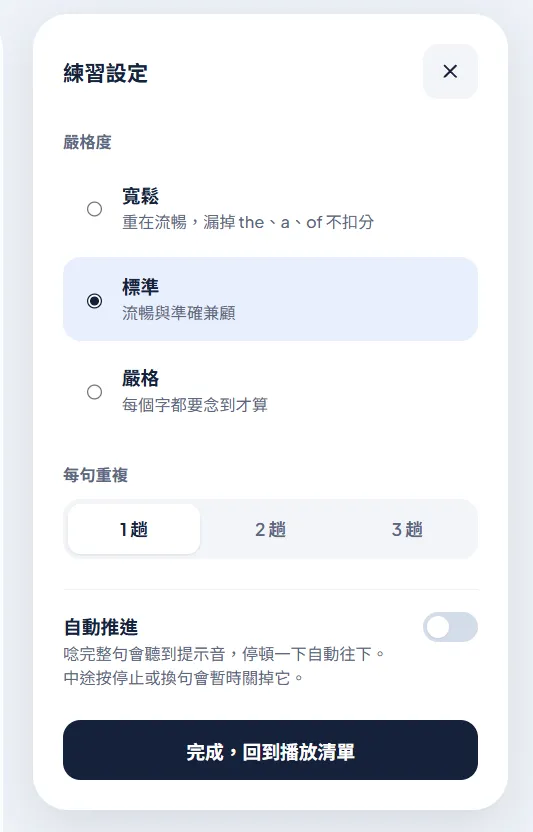
Practice settings let me adjust three things. Strictness has three levels: Relaxed focuses on fluency, so missing small words like the, a, or of doesn’t count as a miss; Standard balances fluency and accuracy; Strict requires every word to be read. The higher the strictness, the more I deliberately read slowly and fully; but it also becomes easier to miss words or have my pronunciation judged wrong, which naturally breaks the overall rhythm. So in practice I mostly use Relaxed and Standard: Relaxed when I want to run through a script quickly, and Standard when I want to make sure I’m reading everything properly. Strict is mainly for testing during development.
I can also repeat each sentence 1–3 times. With Auto-advance on, finishing a whole sentence plays a chime, and after a short pause the app moves on to the next sentence, so I can get through the whole script hands-free. Many of these settings were inspired by Speak, but I wanted them to be more customisable.
When I want to focus, I can switch to Immersive mode. Combined with Auto-advance, I can leave the controls alone entirely and just concentrate on reading along. The demo video at the top was recorded in this mode.
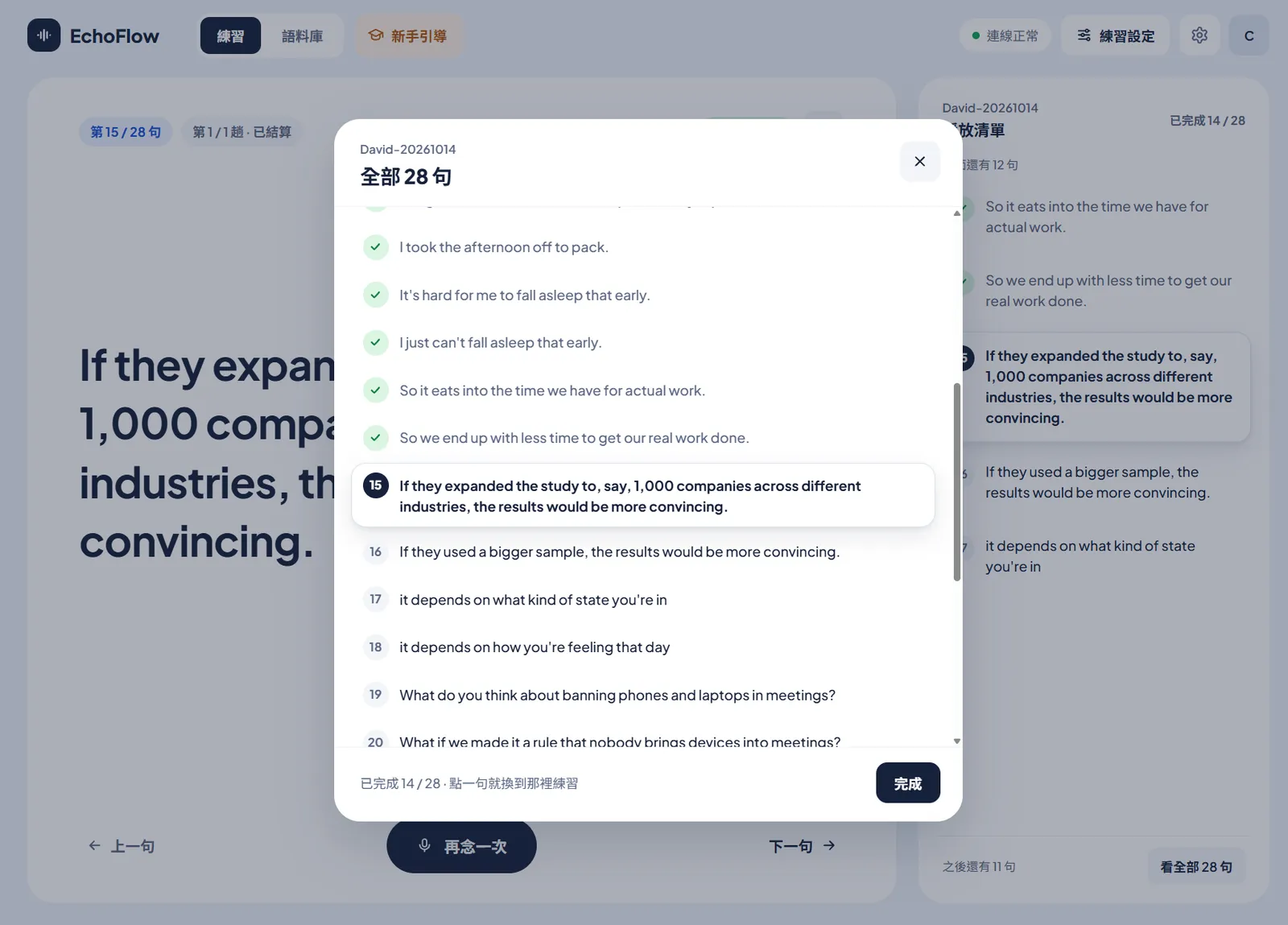
While I practise, the playlist on the right follows the current sentence, and sentences I’ve read the set number of times get a check mark. Clicking “See all” opens the full sentence list, where I can click any sentence to jump to it. Speak doesn’t have this, but it’s very useful when I only want to practise a particular passage.
Wrap Up Each Script with a Summary
After I finish a whole script, the summary screen lists how many words I read in this round, which words didn’t register, and how each sentence went. A word that didn’t register might be one I couldn’t say, one I missed while reading, or one I said too unclearly to be recognised.
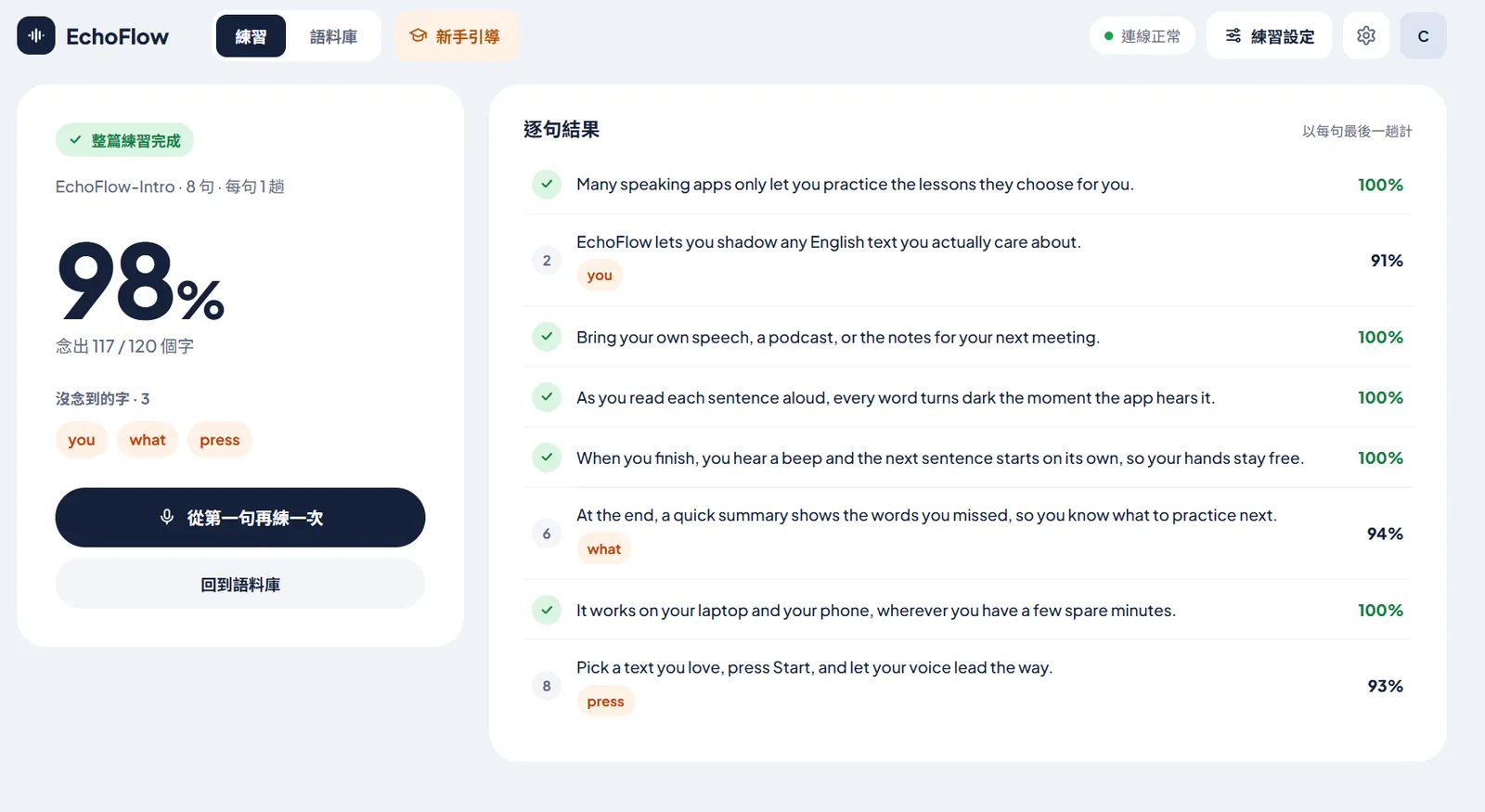
The real value of this summary screen lies in the features that can grow out of it.
Speak doesn’t have a similar summary page, but in modes like AI Q&A, it collects some of my mistakes into practice sentences, which is one of its nicer features.
EchoFlow doesn’t have anything like that yet, but this summary of mistakes is the foundation for such features: recording the mistakes a user makes over time, having an AI Agent organise them or compile statistics, even producing scripts for review. There’s a lot of room to extend it.
But before building this into the app, I had already done something similar outside it, with another project. Only, what it collects isn’t words misread while shadowing, but sentences I said wrong in my Cambly lessons.
Turning My Mistakes in Class into the Next Script
Most of the material I practise comes from my weekly Cambly English tutoring lessons.
In class, most Cambly tutors focus on encouraging students to speak, so as long as the meaning comes across and the grammar mistake isn’t a big one, most of them won’t interrupt the conversation to correct it.
That’s actually what I want, too: I usually tell tutors clearly that I want to practise everyday conversation and topic discussions, and to focus as much as possible on fluency and getting my ideas across.
But it also means that with almost every tutor, whenever my grammar was off or my wording imprecise, the conversation simply moved on as long as they understood what I meant. Mistakes with tenses and prepositions, along with my bad habit of translating straight from Chinese in my head when handling more complex sentences, easily got repeated again and again, and some even became part of how I normally speak.
To review these mistakes, I wrote a project called Cambly-transcriptionist.
After class, it organises the conversation and has AI analyse my error patterns, sentence structure, and imprecise wording, then turns them into review notes with corrected sentences.
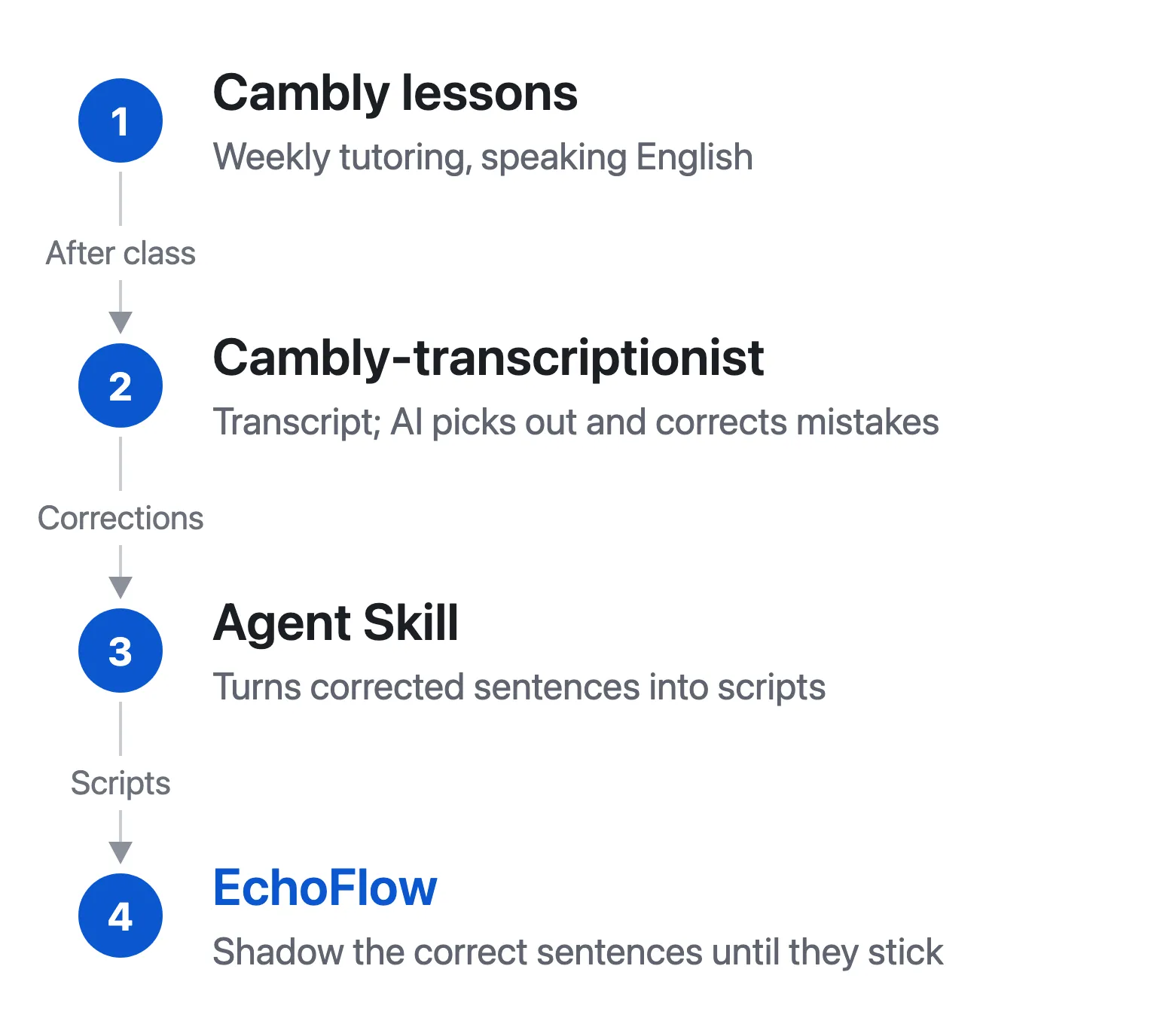
These were originally two unrelated projects, but once both were done, they happened to fit together into one pipeline: the corrected sentences go through the Agent Skill mentioned earlier to become a script, which can be imported straight back into EchoFlow for review. The scripts named after a tutor and a date in the Library screenshot came about exactly this way.
I wrote up my full experience with Cambly lessons in an earlier post (in Chinese).